Tout sur l’API
1️⃣ What is an API?
The API (Application Programming Interface) is a set of rules and protocols that allow different software applications to communicate and interact with each other.
API allows real-time data transfer, whereas sending CSV files requires the data to be inputted manually, which can result in delays between file creation and processing, as well as a higher risk of human error.
With an API connection, it is possible to automate the data import process. Systems can be configured to connect directly to the API and retrieve the necessary data at regular intervals, without human intervention.
Did you know?
The use of an API can offer advanced security measures. API connections can be protected by authentication mechanisms such as API keys, access tokens. Additionally, data is transmitted securely through protocols such as HTTPS (Secure HTTP).
Different Types of APIs
Server-side APIs are used to enable applications to communicate with the server.
Client-side APIs are used to enable applications to communicate with client applications.
Did you know?
The RESTful API is one of the most commonly used types of APIs. It uses standard HTTP methods such as GET, POST, PUT, and DELETE to interact with data. The RESTful API is very flexible and can be used for many applications.
The Architecture Behind an API
JSON is designed to be easy to read and write for humans, while also being easy to parse and generate on the code side. It is often used in APIs to represent and transmit structured data.
HTTP defines different request methods, such as GET, POST, PUT, DELETE, which allow clients to specify the action they want to perform on server resources.
Did you know?
HTTP uses status codes to indicate the result of the request. For example, the code 200 or 201 indicates that the request was successful, the code 400 or 404 indicates that the requested resource was not found, etc.
2️⃣ Requests (GET & POST)
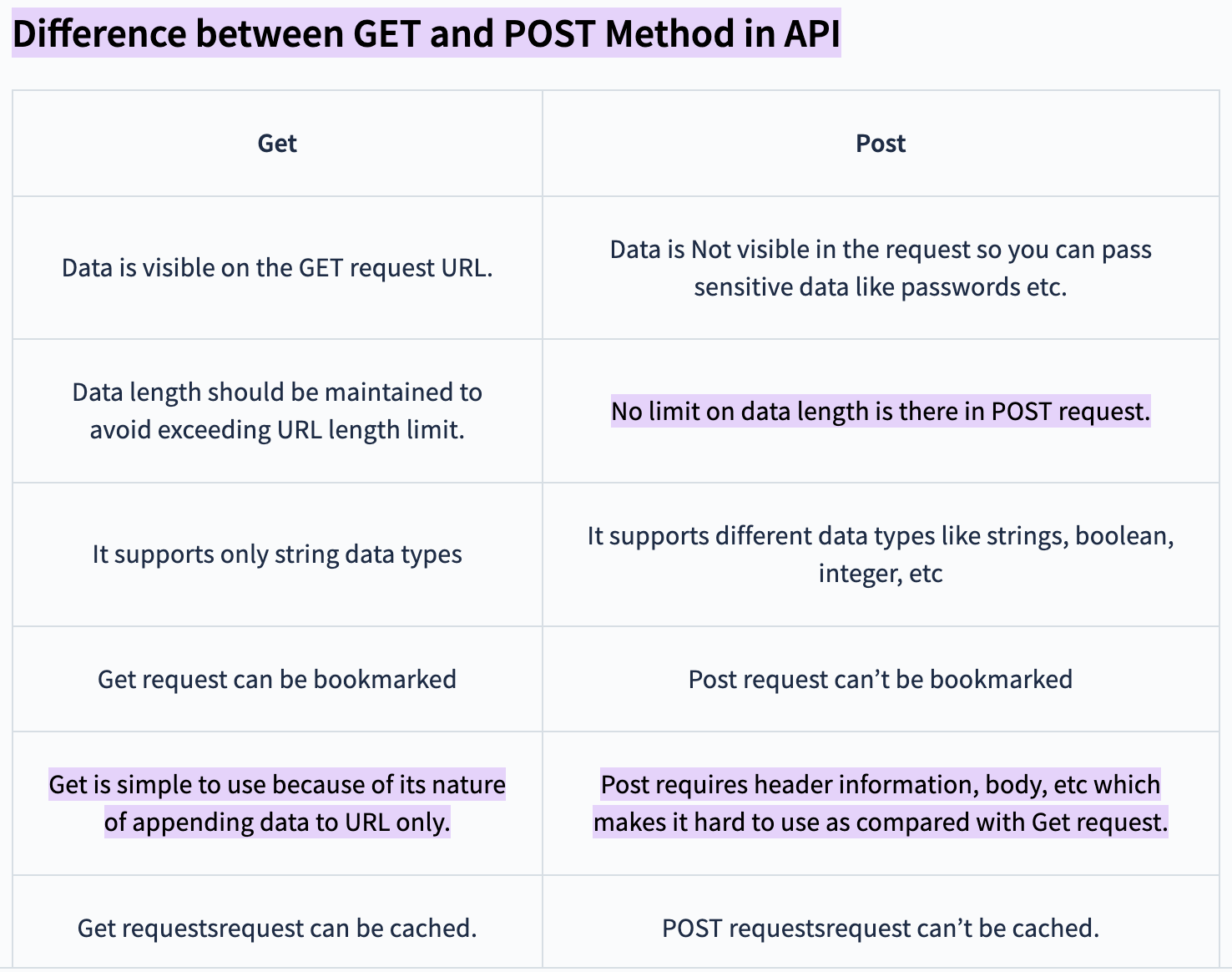
1️⃣ A GET request is used to retrieve data. When a GET request is sent, the client specifies the URL of the resource it wants to reach. Query parameters can also be included in the URL to filter results or specify search criteria.
Example of a GET request:
GET /api/users?id=123
Note: Brands can extract data directly from the platform themselves (CSV). Obviously, the extracted data is part of a specific scope of data (LCA results, traceability, notes, links, etc.). If clients have specific data needs, we can perform custom extractions.
2️⃣ A POST request is used to submit data to the server to create a new resource or perform a specific action. When a POST request is sent, the data to be sent is included in the request body. Unlike the GET request, the POST request can have a side effect, such as creating a new resource or modifying an existing resource.
Example of a POST request:
POST /api/users
Content-Type: application/json
{
”name”: “John Paul”,
”email”: “JohnPaul@example.com”
}
Note: It is important to note that GET and POST requests are only not the only request methods available in the HTTP protocol. There are also other methods such as PUT, DELETE, PATCH, etc., which are used for other types of operations in the context of an API.
3️⃣ Status Codes
The HTTP status code 400 (Bad Request) is returned by a server when the request sent by the client is incorrect or malformatted. This can occur if the request parameters are missing, if the data sent is not valid, or for other error-related reasons.
4️⃣ Advantages of APIs
One of the main advantages of an API is that it allows developers to create applications more quickly. By using the API, developers do not need to create all the necessary features for their application from scratch.
Instead, they can use existing features provided by the API to do the job.
The API also allows applications to communicate with each other.
For example: an e-commerce application can use the API to interact with a payment application. This allows users to place an order and pay for their purchases without having to leave the e-commerce application.
5️⃣ Conclusion